

Bash Scripting: Loops
Bash Scripting: Loops
Loops are a powerful way to repeat commands or tasks multiple times in a script. There are two types of loops in Bash scripting:
-
forloop: repeats a block of commands for each item in a list or sequence of items. -
whileloop: repeats a block of commands as long as a certain condition is true.
For Loop
The for loop is used to iterate over a list of items or a sequence of numbers. Here is the syntax of a for loop:
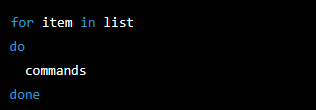
The item variable takes on each value in the list, and the commands are executed for each value.
Here is an example that uses a for loop to iterate over a list of files and display their names:

In this example, the for loop iterates over all files in the current directory with a .txt extension, and the echo command is used to display each filename.
While Loop
The while loop is used to execute a block of commands as long as a certain condition is true. Here is the syntax of a while loop:
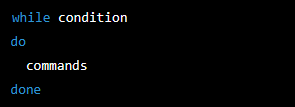
The condition is tested at the beginning of each iteration, and the commands are executed as long as the condition is true.
Here is an example that uses a while loop to display numbers from 1 to 10:
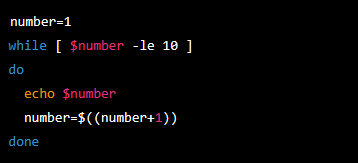
In this example, the while loop continues to execute as long as the value of $number is less than or equal to 10. The echo command is used to display the value of $number, and $number is incremented by 1 after each iteration using the $(( )) syntax.
Conclusion
Loops are a fundamental building block of Bash scripting, and are essential for automating repetitive tasks. By using loops, you can write scripts that are more efficient, more concise, and more powerful.